Schedule
The Schedule page (More > Schedule) shows the week at a glance: who's working each day, that day's deliveries and pickups, and incoming purchase orders. The shifts come from a Google Calendar your store maintains — see Managing The Schedule for adding shifts, and the admin Schedule guide for setup, labor totals, and projections.
Scheduling is enabled per-client by VMX; if you don't see a Schedule tab under the More menu and would like to use it, contact help@vmxllc.com.
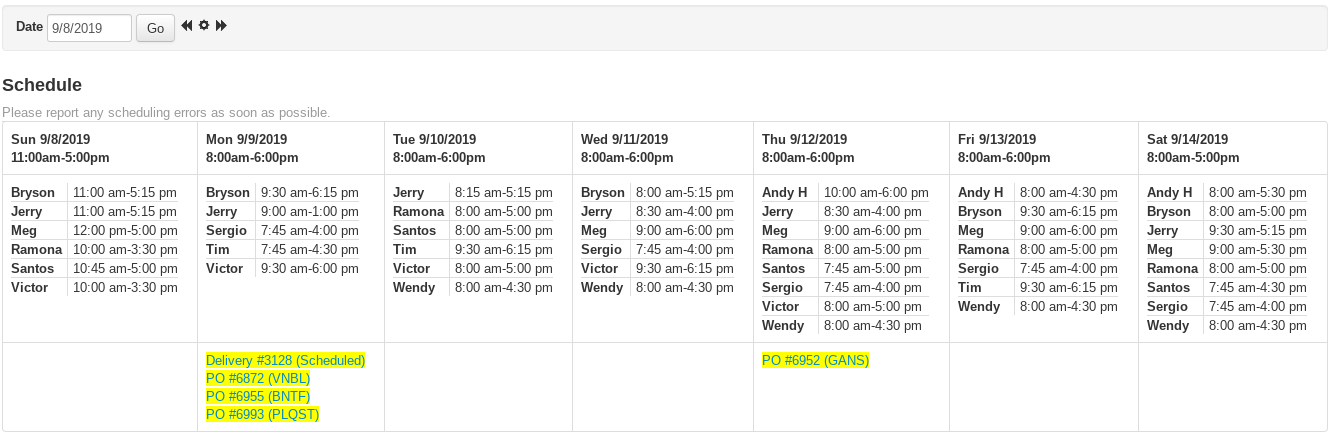
What's on the Schedule Page?
- Days — one column per day, with the date and the store's operating hours for that day (or "Closed") in the header.
- Employees — under each day, the employees working that day are listed with their shift start and end times, in alphabetical order. Days with no shifts show "No one scheduled."
- Deliveries and pickups — listed under their scheduled day as Delivery # or Pickup # with the status in parentheses. Click the number to open the delivery ticket.
- Purchase orders — pending POs appear on their estimated delivery date as PO # with the vendor code in parentheses. Click the number to open the PO. Toggle these with the Show PO's / Hide PO's dropdown.
Moving Between Weeks on the Schedule
The toolbar at the top of the Schedule page navigates by date:
- Select the Date field — a calendar appears so you can jump to any week. Pick a date (or type it) and click Go.
- Use the back and forward arrow icons ("Back 1 Week" / "Forward 1 Week") to step week by week.
- Click the icon between the arrows (its tooltip shows today's date) to return to the current week.
- Switch the Week / Month dropdown to Month and click Go to see the entire month, one week after another.
Setting Up the Schedule for the First Time
The Setup Instructions button on the Schedule page walks through connecting a Google Calendar to VMX: create a calendar, share it with the VMX calendar service account, and paste its Calendar ID into your store's Schedule URL field under More > Admin > Registers. The full walkthrough is in the admin Schedule guide.