Attributes
How Attributes Work in VMX POS:
- Creating Attributes:
- You define attribute types on the Edit Attribute Types page. Attributes can be of different types: Multi Choice (e.g., Light Requirement), Single Choice (e.g., Evergreen), Number (e.g., Mature Height: Min), and Text.
- Filling in Attribute Values:
- When you add or edit an inventory item, you can fill in values for each attribute on the item's Attributes tab — for example Light Requirement, Evergreen, or Mature Height, as pictured below.
- Attributes on Signage:
- Attributes can be displayed on signage to provide detailed information about the inventory items. This helps customers understand the specific features of each item.
- Attributes on Website:
- These attributes can also be displayed on your garden center's website, enhancing the online shopping experience by providing customers with detailed information about each product.
- Searching Attributes in VMX:
- You can search for inventory items based on their attribute values on the Attributes tab of the Inventory area. This allows for efficient filtering and finding of specific items that meet certain criteria.
- Editing Using Inventory Import/Export in Excel:
- You can edit attributes in bulk using the Inventory Import/Export feature with Excel. This enables mass updating of attributes, saving time and effort when making large-scale changes.
This system provides a comprehensive way to manage, display, and search for inventory items based on their specific attributes, enhancing both internal operations and customer experience.
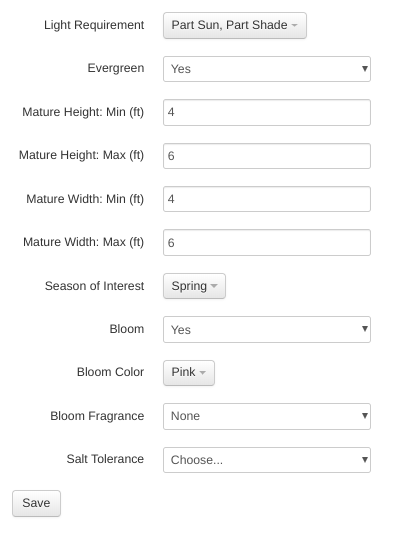
If the item already has attributes selected, then someone has either entered them for this item specifically on this page or imported them from a spreadsheet on the Inventory Import/Export page. \ Learn how to define attribute types, search inventory by attribute, and bulk import/export attributes here:
Attribute Management & Import/Export
If you need to make individual changes to the attributes without importing/exporting the spreadsheet, make the changes on the item's Attributes tab and click Save  .
.
Ask VMXpert to fill them in
If a lot of items are missing the same attribute, you don't have to work through them one at a time or round-trip a spreadsheet. Ask VMXpert (the leaf icon in the top bar): "Which of our perennials are missing their light requirement?", then "Fill those in — show me a few first."
It shows you a sample before writing anything, tells you what the whole job will cost in AI credits, and applies the changes in small batches you confirm. Tell it to skip anything it can't determine honestly rather than guess — a wrong plant fact prints on signs and reads as authoritative. Full detail: Making Changes with VMXpert.