Open to Buy - Items
What's on the Page?
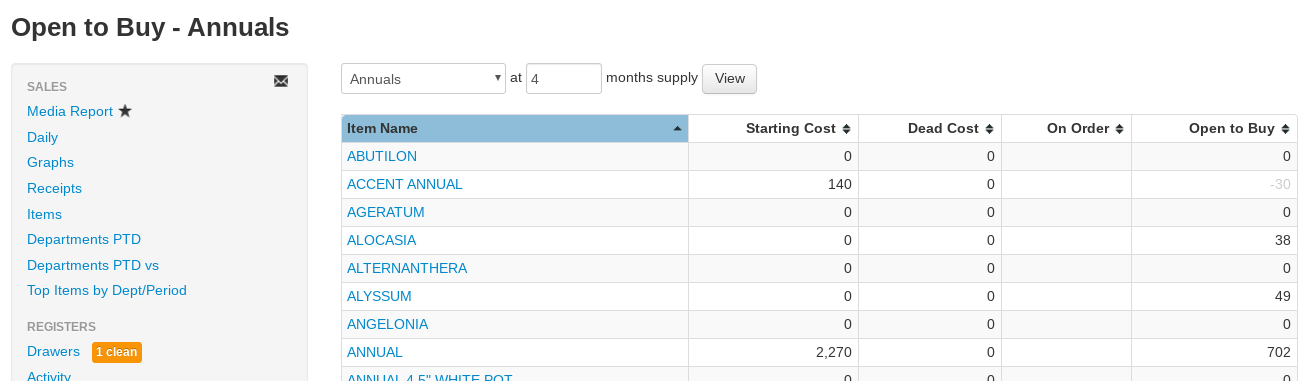
Open to Buy - Items breaks a department's Open to Buy down by item name, showing the current month's buying room for each product line. You can reach it directly from the Open to Buy - All report by clicking a department name.
- Department drop-down — Select the department that you want the report to cover.
- Months supply field — The number of months of supply you want to keep on hand (default 4). This is often determined using the relative turn of a department. For example, some garden centers want to order and sell down on pottery every six months, so they would select "Pottery" as the department and enter "6" months supply.
- All Brands drop-down — Optionally limit the report to a single brand.
- All Divisions drop-down — Optionally limit sales history to one division (shown when your company has more than one division).
- View — Select this button to regenerate the report after changing the input fields.
Reading the Open to Buy - Items Report
Each row covers the current month for one item name:
- Item Name — The name of the item for the row. The report summarizes an Open to Buy amount across all the different sizes and variations that share the item name, based on the associations you make when adding inventory items. Select the name to see all the items associated with it in inventory search.
- Starting Cost — The current cost of on-hand inventory for that item name (average cost × on hand), excluding Dead Cost.
- Dead Cost — The cost of slow-selling inventory (not sold in 2 years or received in 11 months).
- On Order — The cost of that item already on Purchase Orders expected to arrive this month. Click the number to see each PO, its expected date, and amount.
- Open to Buy — The amount of inventory recommended to buy for the current month: this month's projected sales (from a three-year average) plus the target ending inventory for your supply window, minus what you already have on hand and on order. Negative amounts (already overbought) display in gray.