Held Sales
What's on the Page?
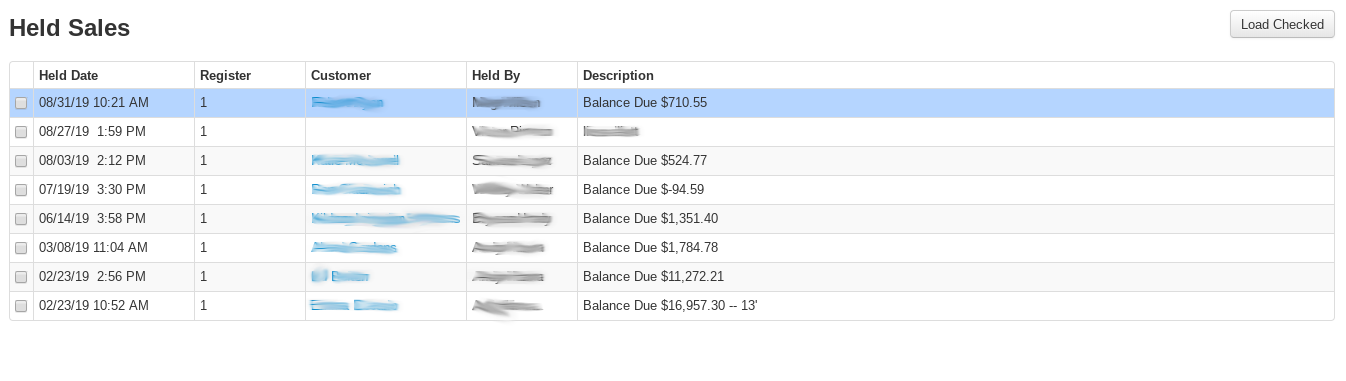
With Checked- After checking held sales, open the With Checked menu to act on all of them at once, for example Sell Checked to ring the checked held sales up together on the register. See "With Checked" below for the full list.
Held Date- The date the held sale was created
Register- The register where the held sale was created.
Customer- The customer name on the receipt being held
Held By- The employee who created the held sale
Description- Either the balance due on the held sale, or a custom note made by the creator of the held sale.
Tip
To get to the Held Sale page, highlight the Tender Section of the Register screen and click the down arrow on your keyboard, or select the "Hold Sale" button on the button panel.
Adding a New Held Sale
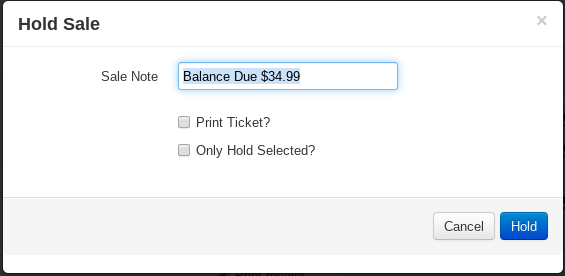
If there are items rung up on the register screen, the dialogue modal below will appear after selecting the hold sale button or clicking the down arrow, and allow you to make a note on the held sale, print a quote, or put only the highlighted items on the Register screen to place on hold.
With Checked
Use held sales as a tool for doing physical inventory and placing/receiving orders with the "With Checked" features!
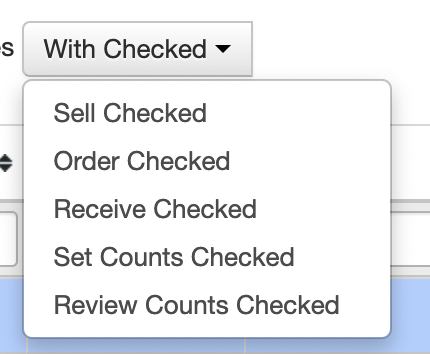
- Sell- load to the register and complete the sale! You can choose multiple held sales and combine them or just click on the one you want to pull up (nothing's changed here!)
- Order- enter the PO# you'd like to add the items to and VMX will add the items and quantities for you for quick receiving!
- Receive- scan incoming products and immediately receive them against an existing PO!
- Set Counts- set the inventory on hand quantity
- Review Counts- review, edit, and set the inventory on hand quantity! See quantity & cost variance and download the review as well.
Archive Checked (parking quotes you are not working on)
Some stores have an Archive Checked option in the With Checked menu. It takes the checked held sales off the main list without deleting them. Use it for quotes that are on pause, such as a customer who is waiting until spring or a project done in phases.
Archived sales move to the Hidden list (see Hidden Held Sales). To see them, click Show only hidden sales. To bring one back to the main list, pull it up at a register and put it back on hold.
Warning
Hidden held sales are deleted automatically after a set time. On most stores this is one year. The banner at the top of the Held Sales page shows the policy for your store. Before that time runs out, pull the quote up and hold it again to keep it.
Archive Checked is enabled per store by VMX. Contact help@vmxllc.com if you would like it.
Reserved column on the Review Set Counts screen
Some stores see a Reserved column at the far right of the Review Set Counts screen. It shows how many of each item are reserved at the store being counted (for example, set aside for a work order or a transfer). If you entered a Count Date, it shows what was reserved at the end of that day. If you did not, it shows what is reserved right now.
The Reserved column is for information only. It does not change On Hand, Qty Change, Cost Change, or the adjustment that Set Counts saves. Count every unit that is physically in the store, including reserved units. For example, if an item shows 10 On Hand and 5 Reserved, and all 10 are on the shelf, enter 10 in Physical Count.
This column is enabled per-client by VMX. Contact help@vmxllc.com with any questions.
Finding every sale that has a particular item on it
The Held Sales list normally answers "who has a sale on hold?". The item search answers the other question: "who ordered tomatoes?" — useful when you take pre-orders or seasonal sales orders and need to know what's actually been spoken for.
Use the two boxes to the right of the Show only hidden sales checkbox:
- Item box — type any part of an item's name, description, or its PLU, then press Enter.
Typing
tomatofinds every held sale with a tomato item on it. - Any Department dropdown — search by department instead. Use this when the item names aren't consistent (e.g. a dozen tomato varieties that don't all have "tomato" in the name) but they all live in the same department.
You can combine them with each other and with the type, division, and hidden filters.
When a search is running, the table gains three extra columns so the result is a usable call list: the customer's Email, the Item(s) Held that matched (with the PLU and the quantity on that sale), and a Qty total per sale. A banner above the table gives you the sale count and the total quantity across all of them.
Use Export CSV at the top right to get the whole list as a spreadsheet for printing or for planning next season's crop.
Not finding last season's orders?
A pre-order is moved to the Hidden list as soon as it's pulled up at a register, so once a season's orders have been filled they all live there. If a search comes back empty, VMX tells you how many hidden sales do match and gives you a button to jump straight to them.
Hidden Held Sales
A held sale moves to the Hidden list whenever it's pulled back up at a register. If you put it back on hold the latest version is saved and it goes back to the main list. If you don't put it back on hold, the held-sale record stays in the Hidden list as a history entry.
Click the Show only hidden sales checkbox above the held-sales table to see them.
Four ways a sale ends up hidden
A sale ends up in the Hidden list whenever it was pulled up at a register and not put back. That happens in four common cases:
- The sale is still loaded on a register screen — someone is working on it right now
- The sale was tendered (rung out) — it became a regular receipt and was never put back on hold
- The sale was pulled up and then cleared from the register screen — abandoned without re-holding
- The sale was manually deconstructed
In all four cases the original held-sale record stays as history. If a hidden held sale's description still shows a balance due but the sale "looks paid," that's case 2 — the cashier rang it out cleanly and never put it back on hold, so the description text is the pre-ringout amount while the actual sale closed at $0 due. The receipt itself is fine.
Putting a hidden sale back on the main list
Pull the sale up at a register, finish any edits, and put it back on hold. VMX saves the latest version and clears the hidden flag.
Auto-deletion
Older held sales (especially hidden ones) get automatically cleaned up after a while to keep the system tidy. The exact retention varies by client and by whether the sale is hidden — the info banner at the top of the Held Sales page shows the policy in effect for your store.
Printing a quote as a proposal with phases
A quote that contains an item from the Phases sub-department prints as a PROPOSAL instead of a plain quote: one section per phase, in the order the phase lines appear on the sale. Ring up the phase item first, then the items that belong to that phase, then the next phase item, and so on.
The phase line's note is the section heading. Put a colon in the note to add a description under the heading: Front Yard: remove existing beds and replant with perennials prints FRONT YARD as the heading and the text after the colon underneath it.
What prints under each heading depends on the store. The standard layout lists each item with its quantity and a total for the section. Some stores print the customer copy with the heading, description and section total only, and the crew's Work Order with quantities and no prices. This per-store layout, and a cover page of terms ahead of the sections, are set up by VMX. Contact help@vmxllc.com if you would like it changed for your store.