Open to Buy - All
What's on the Page?
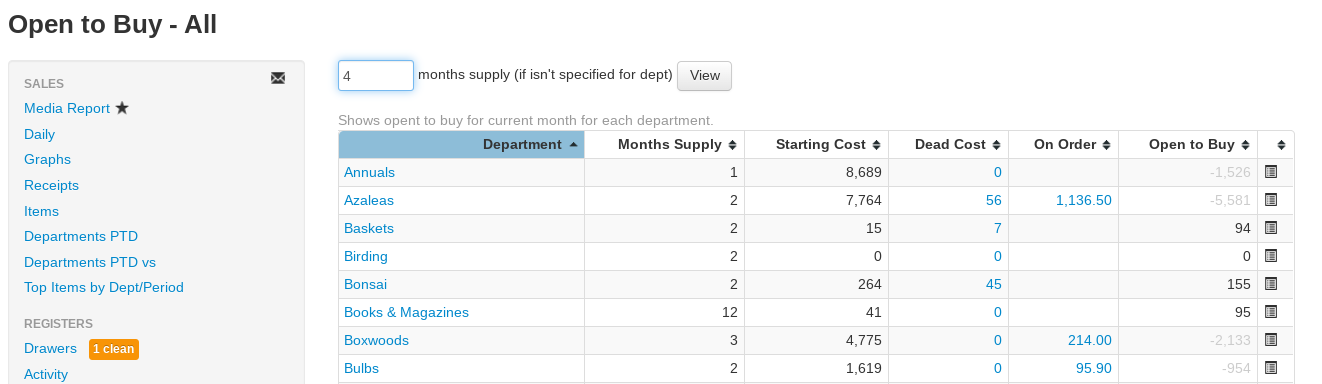
Open to Buy - All shows the current month's open-to-buy for every department at once, so you can see where you're low on inventory compared to the supply you prefer to keep.
Report Inputs
Specify your preferred supply for each department with the Annual Turns field: go to Inventory > Departments, click the edit icon for the department, and fill in Annual Turns. Departments with a turns value use it to set their own supply window (12 ÷ turns, in months).
- Months supply field — The number of months to use for departments that don't have an Annual Turns value set. The report automatically generates with 4 months when you navigate to the page.
- All Brands drop-down — Optionally limit the report to a single brand.
- All Divisions drop-down — Optionally limit sales history to one division (shown when your company has more than one division).
- Click the View button to regenerate the report after changing the inputs.
Reading the Report
- Department — Select the hyperlinked department name to be redirected to the Open to Buy - Items report for that department.
- Months Supply — The supply window used for that department (its Annual Turns-based value, or your entered default).
- Starting Cost — The current cost of on-hand inventory in the department (excluding Dead Cost).
- Dead Cost — The cost of slow-selling inventory (not sold in 2 years or received in 11 months). Select the number to be redirected to the Items Not Selling report for that department.
- On Order — The cost of items on Purchase Orders expected to arrive in the current month. Select the number for a pop-up summary of the orders on the way (vendor, PO#, expected date, and amount).
- Open to Buy — The recommended amount to spend on inventory in that department for the current month. Negative amounts (already overbought) display in gray.
- More Months — Select the list icon at the end of the row to be redirected to the Open to Buy report for that department, which forecasts month by month into the future.
A totals row at the bottom sums Starting Cost, Dead Cost, On Order, and Open to Buy across all departments.