Conversions
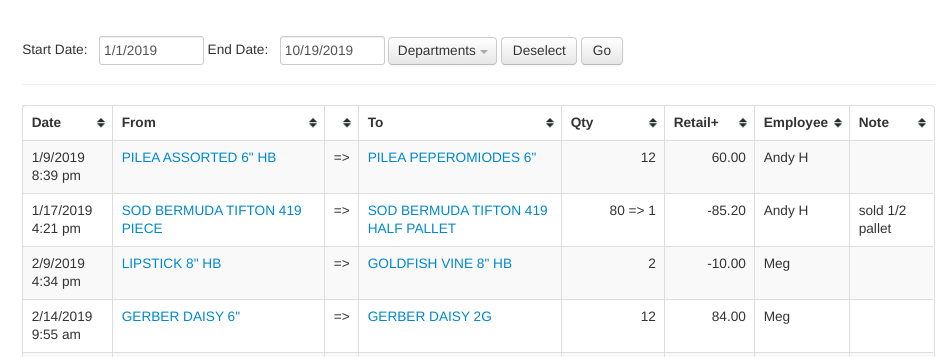
View a complete log of all inventory conversions (converting quantity of one item into another) over any period of time for the store you're signed into.
Filters at the top of the report:
- Start Date / End Date — the period to show; defaults to January 1 of the current year through today
- Departments — a drop-down of checkboxes to limit the report to certain departments, with Select All and Deselect buttons
- Go — click to regenerate the report
Each row shows:
- Date — when the conversion happened
- PLU / From — the item converted from, linked to its item page
- PLU / To — the item converted to, linked to its item page
- Qty — the quantity converted (if the from and to quantities differ, both are shown)
- Retail+ — the change in total retail value caused by the conversion (the "to" quantity × price minus the "from" quantity × price)
- Employee — who performed the conversion
- Note — the conversion note
The totals row sums the quantities and the retail value change. Use the download icon above the table to export it as a CSV file.