Log
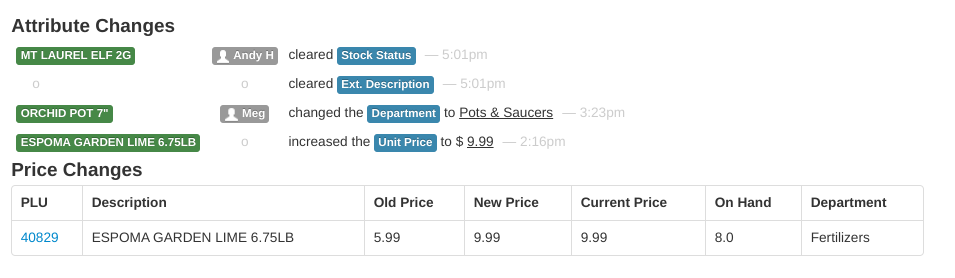
Review all changes made to your inventory here! The Inventory Log covers a date range: enter From and To dates at the top of the page and click View. It defaults to today.
Attribute Changes
The Attribute Changes section lists each change made to an inventory item in the period:
- Item description (linked to the item page)
- Employee who made the change
- A short description of the change made ("increased the Unit Price")
- Time the change was made
If there were no changes, the report shows "There are no inventory changes for this day."
Price Changes
The Price Changes section is a table summarizing the price changes made in the period, one row per item:
- Time (and Date, when viewing a multi-day range)
- PLU — the item number, linked to the item page
- Description
- Old Price — the price before the first change in the period
- New Price — the price after the last change in the period
- Current Price — the item's price right now
- On Hand — current quantity on hand (with a column per store if you have multiple stores)
- Department
Use the download icon above the table to export the Price Changes table as a CSV file.