Media Report
What's on the Media Report?
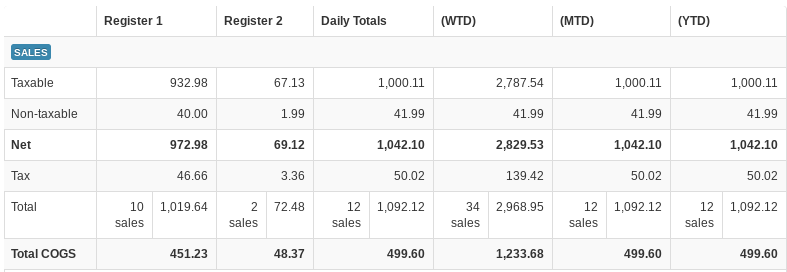
The Media Report breaks down the register activity for the report date — sales, payments on account, deposits, cash payouts, gift cards, store credits, and tenders. Each register used on the report date gets its own column, followed by combined columns for Daily Totals, (WTD) (week to date), (MTD) (month to date), and (YTD) (year to date).
When viewing today's report, a register that has not been closed out yet is marked with a NOT Z label in its column heading.
In the Daily Totals, (WTD), (MTD), (YTD), and (Custom) columns, the linked numbers in the Payments, Deposits, Cash Payouts, Gift Cards, and Store Credits sections open a popup listing the individual receipts behind that figure; each popup has its own Download CSV link. Use the download icon (Download CSV) at the top right of the table to save the whole report as a CSV file.
Media Report sections
SALES — For each register and period: Taxable dollars, Non-taxable dollars, Net sales, Tax collected, and the Total with the number of sales. In the period columns, the Tax figure links to the Taxes report for the same date range. Stores set up with more than one tax type see an additional row per tax type. Accounts using the VMX rewards program can also have a Rewards Used row showing how many reward coupons were redeemed and their dollar total (this row is enabled per-client by VMX — contact help@vmxllc.com if you use rewards and don't see it).
PAYMENTS — Payments made on customer accounts: Net Purchased (the count and amount paid), Net Discount (discounts applied to account payments), and the Total applied to customer accounts.
DEPOSITS — Deposits taken on customer accounts, with the same Net Purchased, Net Discount, and Total rows.
CASH PAYOUTS — Cash paid out at the register: Net Disbursed, Net Discount, and Total.

GIFT CARDS — Gift cards sold: Net Purchased (the count and amount paid), Net Discount (discounts applied to gift card purchases), and the Total gift card credit sold, as seen above.
STORE CREDITS — Store credits issued: Net Issued, Net Discount, and Total.
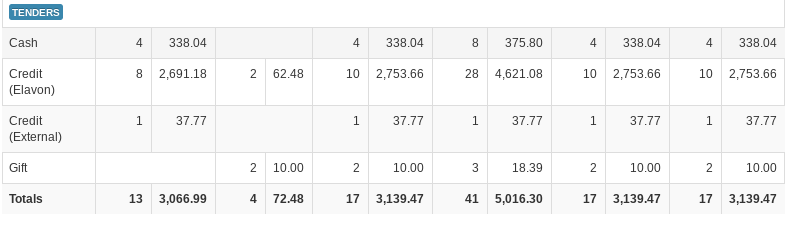
TENDERS — A summary of every payment method taken — cash, check, credit cards (broken out by processor), external credit (for online ordering), gift cards, store credit, and any other tender your garden center uses — with the number of transactions and dollar total for each register and period, as seen above. The Totals row sums all tenders.

At the bottom of the Media Report, a summary box shows the total day's cash and checks — the amount you should expect across the drawers, as shown above.
Run the Media Report for a custom date range
- At the top of the Media Report, enter dates in the Custom Range Start and End fields (a date picker opens when you click each field).
- If your account has more than one division, you can also limit the report with the division selector next to the date fields.
- Click View.
A highlighted (Custom) column is added at the far right of the table covering your date range, and a note above the table confirms: "The "(Custom)" column shows data from (start) to (end). All other columns show data as of (report date)."
Count a drawer with the Bill Counter
Below the Media Report table is a Bill Counter for counting down cash:
- In each Denomination row, type the Count of bills or coins of that denomination (for example,
12on the $20 row for twelve twenties). - You can enter several counts separated by spaces and they are added together.
- Start an entry with
$to add an exact dollar amount instead of a count. - The Total row updates as you type. Press Enter to jump to the next denomination.
- Click Clear Counter to start over.
The Bill Counter is an on-screen calculator only — it doesn't save or post anything.