Units Sold by Period
What's on the Page?
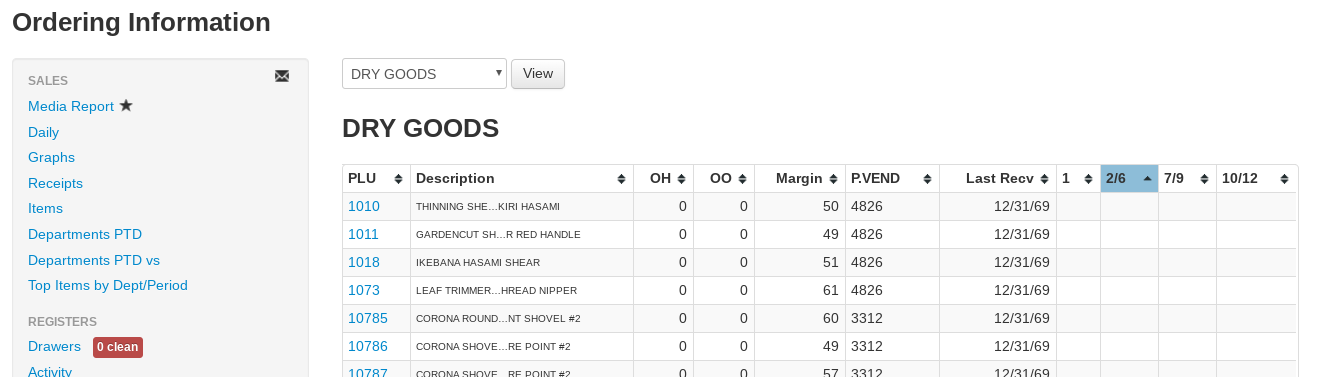
The Units Sold by Period report (found under Reports → Ordering) shows each item's on-hand and on-order position alongside its unit sales broken out period by period — by day, week, month, or year.
- Department drop-down — Select All Departments, a department, or a department/sub-department to report on.
- All Primary Vendors drop-down — Optionally limit the report to items whose primary vendor matches.
- All Divisions drop-down — Optionally limit sales to one division (shown when your company has more than one division).
- Period drop-down — By Day (last 30 days), By Week (last 13 weeks), By Month (last 13 months), or By Year (last 5 years). Each period becomes a column on the right side of the table.
- All stores checkbox — For multi-store companies, combine every store's quantities and sales.
- View — Select this button to generate the report after changing the input fields.
Use the download icon above the table to export the report to CSV.
Reading the Report
- Dept / Sub. Dept — The item's department and sub-department (shown when the report isn't already limited to one).
- PLU — The item number, hyperlinked to the item page.
- Description — The name and size of the item.
- Vendor — The item's primary vendor.
- Last Received — The date the item was last received.
- OH — On Hand: the current quantity in inventory.
- OO — On Order: the quantity currently on open purchase orders.
- YTD Units Sold / YTD Sales $ / YTD Margin — Units, sales dollars, and margin percent for the year to date.
- LYTD Units Sold / LYTD Sales $ — Units and sales dollars for the same year-to-date window last year.
- TTM Receipts — The number of receipts the item appeared on in the trailing twelve months.
- TTM Qty Received — The quantity received in the trailing twelve months.
- TTM Sell Thru % — Trailing-twelve-month units sold as a percentage of units received.
- Avg. Cost — The item's average cost.
- Retail $ — The item's retail price.
- Period columns — One column per day, week, month, or year (depending on the Period drop-down), showing the units sold in that period. A totals row at the bottom sums each column, and the totals update as you filter rows.