Coupons
What's on the Page?
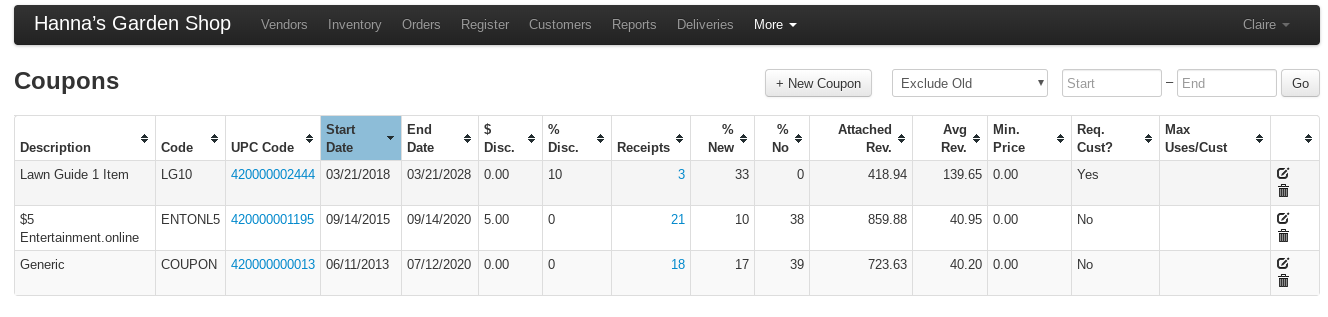
The Coupons page lists every coupon your store has set up, along with how often each one has been redeemed. Open it from More → Coupons in the top menu.
Tip
The Coupon feature is for a discount the customer has to mention (or hand over) to be eligible, which the cashier then applies to an item or to the whole sale. To discount an item automatically, with nothing for the cashier to do, use a Price Rule instead.
Info
Who can open the Coupons page is set per-client by VMX. At most stores, anyone who can reach the page can add, edit, and delete coupons; some stores are set up so the page asks for an administrator sign-in first. Contact help@vmxllc.com if you want this changed for your store.
Search Filters
The controls at the top of the Coupons page decide what you're looking at.
Toggle between Exclude Old and Show All on the drop down field to control which coupons appear in the table. Exclude Old (the default) hides coupons whose End Date is 30 or more days in the past; Show All lists every coupon. Changing the selection reloads the page on its own.
The Start and End date fields control which receipts are counted in the usage columns (Receipts, Qty Redeemed, % New, % No, Attached Rev., Avg Rev., and Discount) — pick dates on the pop up calendar, then select the Go button to recalculate the table below. Leave both blank to count every receipt ever. These dates do not change which coupons are listed, only the numbers next to them.
If your business has more than one sales division, an All Divisions dropdown also appears so you can limit the usage numbers to one division.
The download icon on the same row exports the table you're looking at as a Coupons.csv file.

Coupon Information Table
Each row on the Coupons page is one coupon. The usage columns (Receipts through Discount) reflect the Start/End dates and division you filtered by; the rest are the coupon's own settings.
- ID- the coupon's internal number
- Description- The name of the coupon entry
- Code- a readable unique code attached to each coupon
- UPC Code- a scannable barcode number, worked out from the coupon's ID. It exists as soon as the coupon is saved and can't be typed in or changed. Select it to open a printable barcode.
- Start Date- The date the coupon becomes active
- End Date- The date the coupon expires
- $ Disc.- The dollar amount subtracted from a subtotal or item
- % Disc.- The percentage subtracted from a subtotal or item
- Receipts- The number of receipts in the selected date range that the coupon appears on. Select the number to see those receipts and the items on them.
- Qty Redeemed- how much redemption the coupon accounted for, rather than how many receipts it turned up on. A coupon applied five times to one sale counts as 5, and an item coupon applied to a line of five counts as 5 — either way that receipt is still 1 in the Receipts column
- % New- of those receipts, the percentage where the customer's account was created on the same day as the sale
- % No- The percent of receipts that used the coupon with no customer account attached
- Attached Rev.- what was actually paid on the receipts this coupon appeared on, before sales tax (coupon and reward amounts are not counted as payment)
- Avg Rev.- Attached Rev. divided by Receipts
- Discount- the total $ discounted by this coupon in the selected date range
- Min. Price- the smallest amount the coupon can be applied to. On an item coupon this is measured against the whole line (quantity × price, after any discounts already on it), not the price of one unit; on a subtotal coupon it is measured against the sale's subtotal
- Max. Price- the largest amount the coupon can be applied to, measured the same way (blank for no limit)
- Max Qty- the maximum quantity on a single item line the coupon can apply to (blank for no limit)
- Req. Cust?- whether a customer account is required on the receipt before the coupon can be applied.
- Max Uses/Cust- limit the customer to a specified number of uses of the coupon on the history of their account.
- Note- the note shown to employees when they apply the coupon to a sale
- Edit- select the pencil icon to edit the details of the coupon-- detail below
- Delete- select the trash icon to delete the coupon — a coupon that has been used on a receipt cannot be deleted; see Deleting a coupon below
The coupon's Type (Item, Subtotal, or Both) is not shown in the table. Select the pencil icon on the row to see it.
Info
The Discount column does not include the value of promotions triggered by coupons — only the coupon's own direct % or $ discounts.
Tip
On the Register screen whilst applying coupons, if one is applied incorrectly, a large message appears near the top of the screen so you can amend the sale or edit the coupon. See What the register checks when a coupon is applied below for what each message means.
See which receipts a coupon was used on
On the Coupons page, select the number in the Receipts column to open a window with two tabs:
- Receipts — one row per receipt, with # (select it to open the receipt), Date, Store, Subtotal, and Attached Revenue. The download icon exports this list.
- Items — PLU, Description, Quantity, and Revenue for the items sold on those receipts. This is every item on those receipts, not only the lines the coupon was applied to.
This window always shows the coupon's complete history. It ignores the Start/End dates and the division you filtered the table by.
Adding and Editing Coupons-
Select the "+ New Coupon" button to add a new coupon or select the pencil icon on the far right side of a coupon entry to edit an existing coupon. Either opens the Coupons Info window; select Create (or Update) to save, or Cancel to back out.
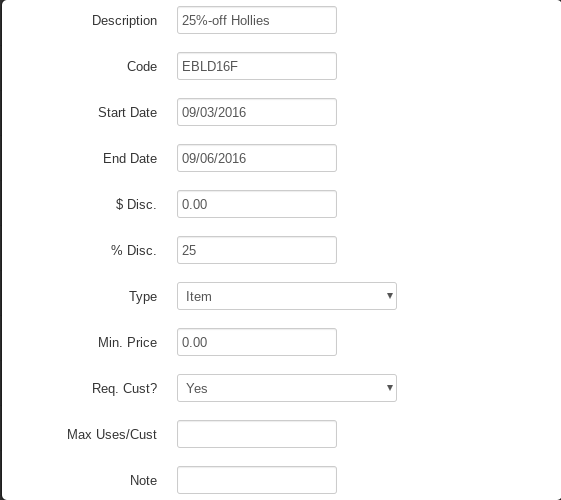
- Description- The name of the coupon entry (up to 64 characters)
- Code- a readable unique code attached to each coupon. Codes must be unique — reusing one shows "Another coupon already exists with this code."
- Start Date- The date the coupon becomes active
- End Date- The date the coupon expires
- $ Disc.- The dollar amount subtracted from a subtotal or item
- % Disc.- The percentage subtracted from a subtotal or item. Enter it as a whole number — 10 means 10% off. A single coupon cannot have both a % discount and a $ amount; entering both shows "A single coupon cannot have a %-discount and a discount amount."
- Type- Specify using the drop down menu (Item, Subtotal, or Both) whether you would like the coupon to work on only items, only the subtotal, or on either — see Coupon types: Item, Subtotal, and Both below
- Min. Price- the smallest amount the coupon can be applied to — the whole item line (quantity × price) for an item coupon, or the sale's subtotal for a subtotal coupon. Leave it at 0 for no minimum
- Max. Price- the largest amount the coupon can be applied to, measured the same way (leave blank for no limit)
- Max Qty- the maximum quantity on a single item line the coupon can apply to (leave blank for no limit)
- Req. Cust?- Select whether or not you want to require a customer account on the receipt before being able to apply the coupon.
- Max Uses/Cust- limit the customer to a specified number of uses of the coupon on the history of their account. Leave blank for no limit — see Max Uses/Cust: how per-customer limits are counted below.
- Note- add a note for employees to see while applying the coupon to a sale.
Saving a new coupon does not create a barcode field for you to fill in — the UPC Code on the table is worked out from the coupon's ID automatically.
Coupon types: Item, Subtotal, and Both
A coupon's Type, set on the Coupons Info window, decides what the coupon attaches to at the register. This is the setting people get wrong most often, because it also changes how Min. Price, Max. Price, Max Qty, and Max Uses/Cust are measured.
- Item — the coupon attaches to one selected line on the sale. Min. Price and Max. Price are checked against that whole line — quantity × price, after any discount already on the line — so five $12 plants count as $60, not $12. Max Qty is checked against that line's quantity. Trying to apply an Item coupon while the sale is on the subtotal shows CHOOSE ITEM FIRST.
- Subtotal — the coupon attaches to the whole sale, not to any line. Applying one switches the sale into subtotal mode automatically. Min. Price and Max. Price are checked against the sale's subtotal, and Max Qty is not used. Trying to apply a Subtotal coupon while a line is selected shows CHOOSE SUBTOTAL FIRST.
- Both — the coupon can be applied either way: to a selected line, or to the subtotal.
Because a Subtotal coupon lands on the sale rather than on a line, it can be applied more than once on the same ticket unless you set Max Uses/Cust and require a customer.
Whichever type you choose, the register caps a $ coupon so it can never discount more than the item or subtotal it is applied to.
Max Uses/Cust: how per-customer limits are counted
Max Uses/Cust on the Coupons Info window limits how many times one customer can use that coupon. Leave it blank for no limit. Two things about how it counts surprise people:
- The limit is only checked when a customer is attached to the sale. If the cashier rings the sale with no customer, there is nothing to count against and the coupon goes through. Set Req. Cust? to Yes on the same coupon if the limit needs to hold.
- Past uses count once per receipt. A previous receipt where the coupon was applied five times counts as one use, not five. Uses added on the sale in progress do count individually, whether they are on item lines or on the subtotal. Uses on a return receipt count in reverse, giving the customer the use back.
When the customer is already at the limit, the cashier sees a prompt: "This coupon can only be used N time(s) per customer. It has already been used M time(s). Allow this customer to use this coupon now?" Selecting OK lets the sale continue anyway, so by default the limit is a check rather than a hard stop. Some stores are set up by VMX to enforce it as a hard limit with no override — contact help@vmxllc.com if you want the limit to stop the sale outright.
Deleting a coupon
Select the trash icon at the right of a row on the Coupons page and confirm the prompt to delete a coupon. Deleting is permanent — there is no undo.
A coupon that has ever been used on a receipt cannot be deleted. If the Receipts column shows anything other than 0, expect the delete to be refused — and clear the Start/End dates before you judge that, because a 0 there only means the coupon wasn't used inside the dates you filtered by. Which message you get depends on how the coupon was used:
- Used on a receipt's subtotal — the delete stops with "This coupon cannot be deleted because one or more receipts reference it."
- Used on an item line, or recorded as a coupon tender on a finished receipt — the delete stops with a shorter message naming the coupon's ID, for example "Failed deleting Coupons # 12." It means the same thing: past receipts still point at this coupon, so it has to stay.
Only a coupon that has never been used will actually delete. The two messages are not something you can work around from this page, and there is no reason to try — the receipts that used the coupon are the store's sales history.
The way to retire a coupon that has been used is to leave it in place and set its End Date to a date in the past. The coupon drops off the register's Choose Coupon list, so it stops being offered, and all of the usage history stays intact. Set the Exclude Old / Show All dropdown to Show All to see retired coupons on this page again.
If someone pulls an end-dated coupon up by scanning or by number, the register asks the cashier to confirm before using it — but only once the End Date is more than a day in the past, so back-date it by several days rather than by one if you want that warning.
What the register checks when a coupon is applied
The settings on the Coupons page are enforced at the register when the cashier applies the coupon. The message appears as a large banner near the top of the Register screen, and the coupon is not added, so the cashier can correct the sale and try again.
- COUPON REQUIRES CUSTOMER — the coupon has Req. Cust? set to Yes and there is no customer on the sale. Add the customer, then apply the coupon.
- MIN PRICE $X / MAX PRICE $X — what the coupon is being applied to is outside the coupon's Min. Price / Max. Price range. On an item coupon that is the whole line (quantity × price, after discounts already on it); on a Subtotal coupon it is the sale's subtotal.
- COUPON MAX QTY N — the item line's quantity is above the coupon's Max Qty.
- NO COUPONS AFTER TENDERING — payment has already been started on this sale, so no more coupons can be added to it.
- RETURN COUPON NOT ALLOWED — the register is in return mode (Return Item was pressed). Press Return Item again to switch it off, then apply the coupon.
- COUPON NOT ALLOWED ON NON-DISCOUNTABLE ITEM — the item is set to never be discounted. Change the item's discountable setting if it should accept coupons.
- COUPON QTY NOT ALLOWED — a quantity was typed before the coupon. On an item line the typed quantity has to match the line's own quantity; on the subtotal no quantity is allowed at all. Clear it and apply the coupon again.
- CANNOT APPLY COUPON > 1 ITEM AT ONCE — more than one line is selected. Apply the coupon to one line at a time. (Applying a coupon to several selected lines at once is enabled per-client by VMX — contact help@vmxllc.com if you'd like it.)
- CHOOSE ITEM FIRST — an Item coupon was applied while the sale was on the subtotal. Select the line first.
- CHOOSE SUBTOTAL FIRST — a Subtotal coupon was applied while a line was selected. Go to the subtotal first.
- NO ITEM SELECTED — no line is selected and the sale is not on the subtotal. Select the line the coupon belongs to.
A coupon worth $0.00 can also be attached to a sale that has already finished — the register asks "This sale has already finished. Append coupon information to current receipt?" and, if the cashier accepts, records the coupon on that receipt so it still counts in the usage columns.
If the coupon is used before its Start Date, or more than a day after its End Date, the cashier is asked to confirm ("This coupon is not active for another N day(s). Use anyways?" or "This coupon expired N day(s) ago. Use anyways?") and can choose to go ahead. Some stores are set up by VMX to refuse out-of-date coupons outright instead of asking, with COUPON INACTIVE or COUPON EXPIRED — contact help@vmxllc.com if you want the dates enforced that way.
Scanning a coupon's printed UPC Code at the register pulls the coupon up directly. Coupon barcode scanning is turned off for some stores, because their item barcodes overlap the coupon number range — contact help@vmxllc.com if scanning a coupon barcode doesn't find the coupon at your store.
For the cashier's side of this — selecting the item or subtotal and picking the coupon — see Making a Sale.
Error messages when saving a coupon
These appear in a pop up when you select Create or Update on the Coupons Info window. The coupon is not saved until the problem is fixed.
- "Another coupon already exists with this code." — the Code is already in use by another coupon. Codes must be unique; pick a different one.
- "The coupon description is too long." — the Description is over 64 characters. Shorten it.
- "A single coupon cannot have a %-discount and a discount amount." — both $ Disc. and % Disc. were filled in. Clear one of them.
- "Invalid end date." — the End Date couldn't be read as a date. There is no calendar in this window, so type it out, for example
12/31/2026. (Start Date is more forgiving: if it can't be read, the coupon is saved as starting today.) - "Min price must be a positive number." / "Max price must be a positive number." — Min. Price / Max. Price must be a number of zero or more. Leave Max. Price blank for no limit.
- "Invalid entry for Max Qty." — Max Qty must be a number, or blank for no limit.
- "Invalid entry for Max Uses Per Customer." — Max Uses/Cust must be a whole number, or blank for no limit.