Daily
What's on the Page?
Tip
To see the Daily Inventory Report for a past day, use the date field at the top left of the screen and select the day you would like to view.
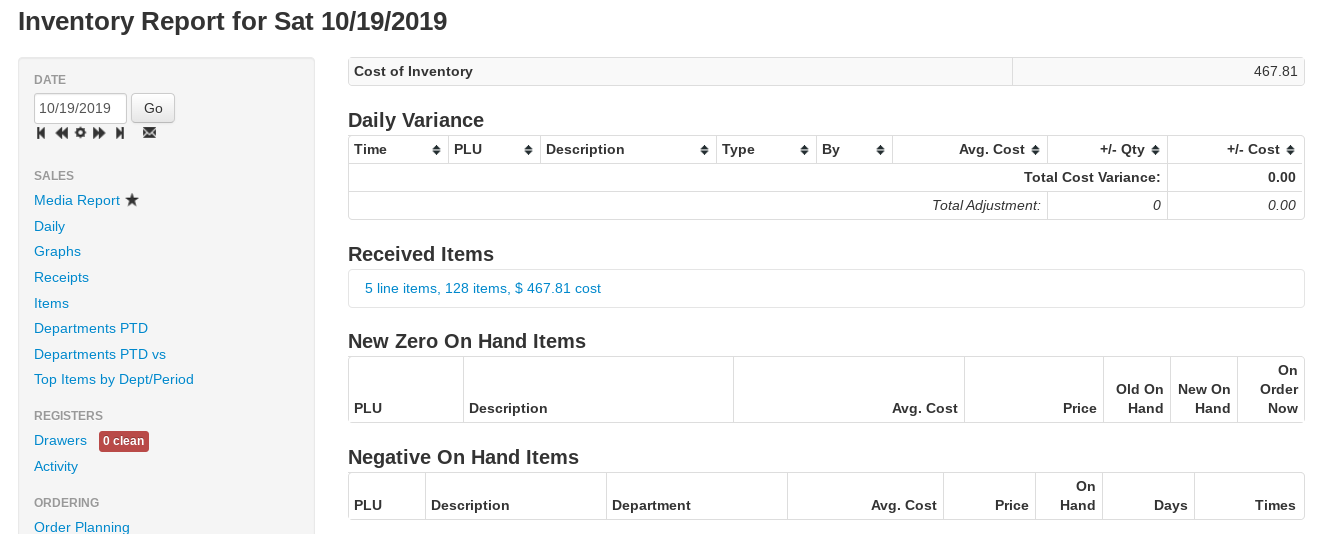
Cost of Inventory
The total cost of inventory in stock at your store as of the report date.
Daily Variance
A summary of all the manual changes made to the inventory during the day:
- Time — the time the change was made
- PLU — the item number, hyperlinked to the item page
- Description — consignment items are marked Consignment
- Department
- Type — what type of variance was recorded (a quantity adjustment, manual sale, receipt-related change, etc.)
- By — employee who made the change
- Avg. Cost
- +/- Qty — the change in quantity that resulted from the inventory action
- +/- Cost — the change in Cost of Inventory due to the inventory action
- $ Gap — the size of the cost change, ignoring direction
The totals row shows the total dollars added or subtracted from the Cost of Inventory for the day, and Total Adjustment shows the total size of all quantity changes (added and removed both count toward the total). Consignment items are not included in the cost totals. Use the download icon above the table to export it as a CSV file.
Received Items
A summary of items received during the day, showing the number of receiving line items, total items received, and the cost of inventory received that day. Click the summary line to expand all the information on the received items for the day, organized by Purchase Order.
New Zero On Hand Items
This table lists the items that reached a quantity of zero (or below) during the day:
- Old On Hand — how many items were in stock prior to the item being sold out or manually zeroed out
- New On Hand — the quantity on hand as of the end of the report day; this will be either zero or a negative number
- On Order Now — quantity on order
Negative On Hand Items
Shown when viewing today's report — the items currently below zero on hand:
- On Hand — current quantity on hand
- Days — number of days since the item went negative
- Times — number of times the item has gone negative in the last 2 months
Price Changes
A table of the item prices changed on the report day: PLU, Description, Old Price, New Price, Current Price, On Hand, and Department.